 ICC
ICC With the ICC Zillas Sync EA, every trade you close in MetaTrader 5 (or 4) lands in your trading journal by itself, about every 30 seconds, with entry, exit, size, stop, target, commission and swap. Set it up once in about five minutes.
What you need: MetaTrader 5 or 4 on a computer or VPS that stays on, and an ICC Zillas account (the free trial includes auto-sync).
1. Add your MetaTrader account in ICC Zillas
Open Accounts & Import, press New account, choose the platform MetaTrader 5 (or 4), give it a name and the starting balance, and press Auto-sync on its card.
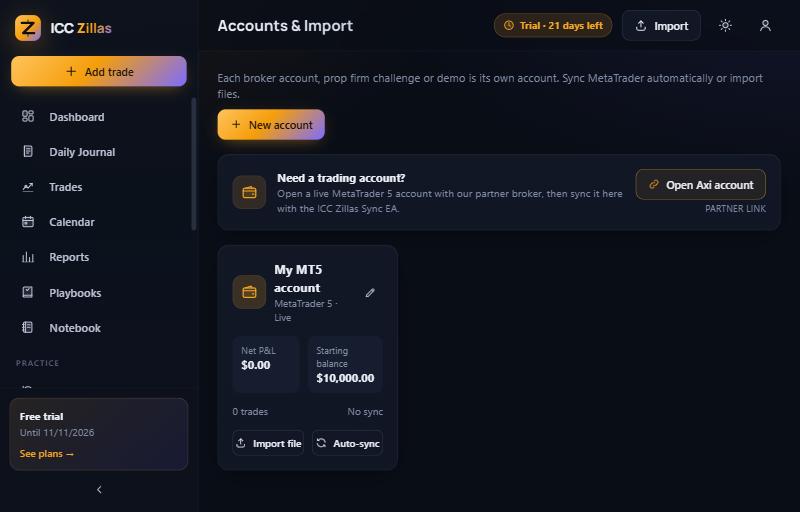
2. Download the EA and allow the web address
- In the Auto-sync window press ICC_Zillas_Sync.mq5 (.mq4 for an MT4 account) to download it.
- In MetaTrader open File › Open Data Folder › MQL5 › Experts (MQL4 for MT4) and copy the file there.
- Double-click it to open MetaEditor and press Compile. It should finish with 0 errors.
- In MetaTrader open Tools › Options › Expert Advisors, tick Allow WebRequest for listed URL
and add
https://zillas.iccterminal.trade.
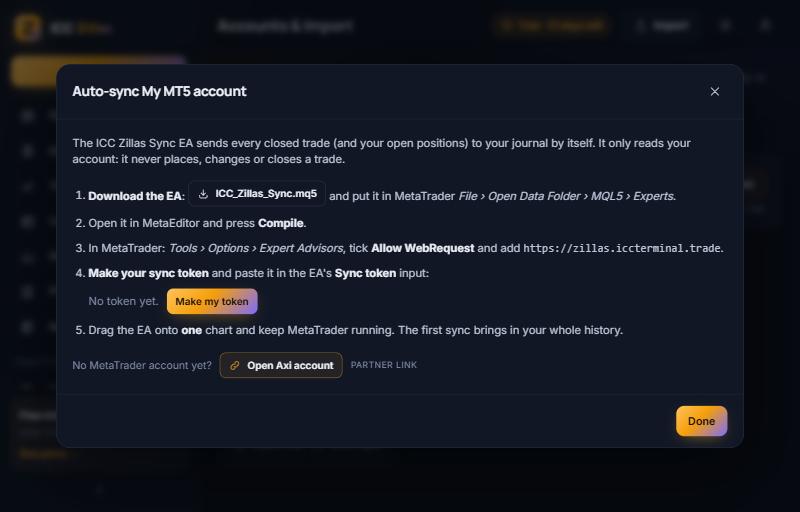
3. Make your sync token
Press Make my token and copy it. It starts with zs_ and is shown only once, so keep it private. Each
ICC Zillas account has its own token, so use one MetaTrader account per token.
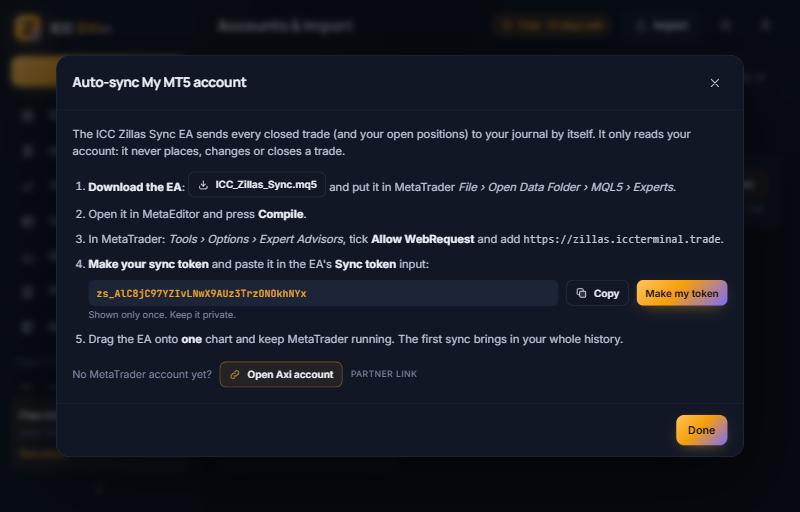
4. Attach the EA to one chart
- In MetaTrader's Navigator under Expert Advisors, drag ICC_Zillas_Sync onto one chart (any symbol).
- In the inputs paste the token into Sync token. Leave the server as
https://zillas.iccterminal.tradeand the sync time at 30 seconds, then press OK. - The chart's top-left corner now shows ICC Zillas Sync (read only) and, after the first sync, Synced: … closed checked, … open.
Keep MetaTrader running. A VPS keeps it running when your computer is off.
5. See your first trades
The first sync brings in your whole history. The account card then shows Synced with the time, the balance and the number of trades, and every trade appears on the Trades page, with open positions marked OPEN until they close.
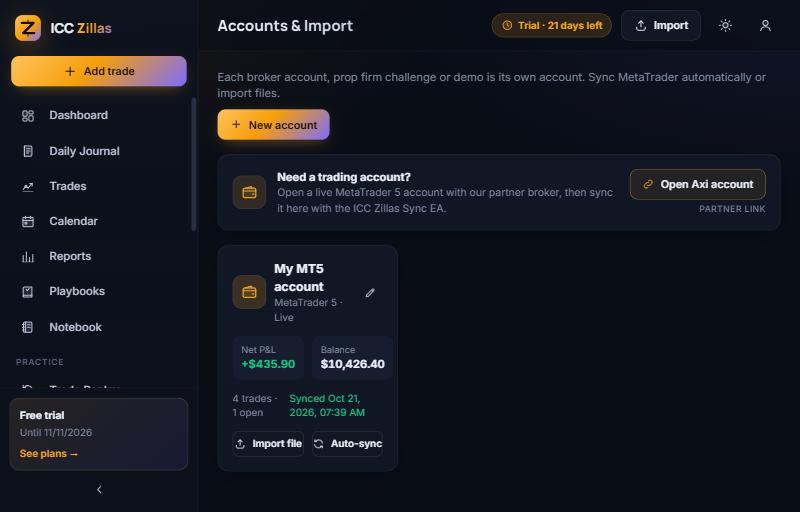
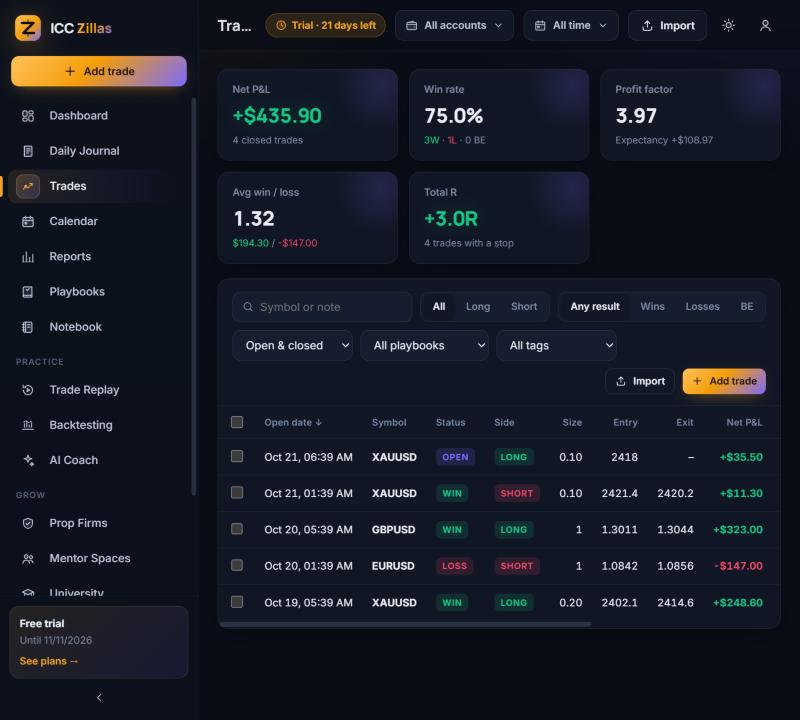
Screenshots from a test account with example trades.
Troubleshooting
| The chart shows | What to do |
|---|---|
| Add https://zillas.iccterminal.trade in Tools > Options > Expert Advisors > Allow WebRequest | MetaTrader blocked the web request. Tick Allow WebRequest for listed URL, add the address exactly, press OK, then re-attach the EA. |
| Sync token not accepted: make a new one in ICC Zillas > Accounts | The token was mistyped or replaced. Make a new token in the Auto-sync window and paste it into the EA's Sync token input. Making a new token stops the old one. |
| A pop-up asks you to paste your sync token | The Sync token input is empty. Open the EA's inputs and paste it. |
| No connection to ICC Zillas (error …), will retry | The internet or our server was not reachable for a moment. The EA tries again by itself. |
| Nothing, or no trades arrive | Check that the EA is on a chart (its top-left corner shows ICC Zillas Sync) and that MetaTrader is running. Only closed trades and open positions are sent, so a new account without trades shows nothing yet. Making a token needs a plan with auto-sync: the free trial, Essential, Pro or Elite. |
Is it safe?
- Read only: the EA only reads your account history and open positions. It never opens, changes or closes a trade, and it has no trading code.
- No password: it uses a private token you make in ICC Zillas, not your MetaTrader or investor password.
- One token per account: a token only writes to the one ICC Zillas account it belongs to, and you can replace it at any time.
- No duplicates: every trade is matched by its position number, so a trade is never added twice.
Other ways to bring trades in
- Upload a report: MT5 History › Report › HTML, or MT4 Save as Detailed Report.
- CSV from cTrader, TradingView, NinjaTrader, Tradovate, Binance and prop firm dashboards.
The guide covers every option, including imports. Trading a challenge? Set the rules in the prop firm tracker and the synced trades are checked against them.
Auto-sync, reports, the calendar and the prop firm tracker are all in the 21-day free trial. No card needed.
Start free →Questions
Does the ICC Zillas Sync EA place trades?
No. It only reads your closed trades and open positions and sends them to your journal. It has no trading code and never opens, changes or closes a trade.
Do I need to give my MetaTrader password?
No. The EA uses a private sync token that you make in ICC Zillas. Your MetaTrader and investor passwords are never asked for.
How often does it sync?
Every 30 seconds by default (the 'Sync every' input, at least 10 seconds), while MetaTrader is running. The first sync brings in your whole history.
Does it work with MetaTrader 4 and prop firm accounts?
Yes. There is an MT4 version (ICC_Zillas_Sync.mq4), and it works with any broker or prop firm account you can open in MetaTrader 4 or 5.
More free tools
- Free trading journal template (Excel and Google Sheets)
- R-multiple and expectancy calculator
- Prop firm challenge tracker and rules compared
- Prop firm drawdown calculator: daily, static and trailing
- ICC Charts trading tools: lot size, pip value, risk-reward and more
- ICC Chart Challenge: free ICT chart game